


Ergonomics for Hybrid Teams: Supporting Employees at Home and in the Office
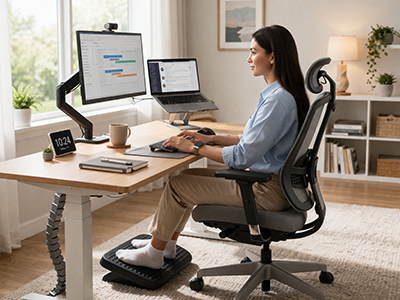
The modern workplace has changed dramatically. For many businesses, the question is no longer whether employees work remotely—it’s how to support them effectively wherever they are. As hybrid work becomes the standard operating model, a new challenge has moved to the top of the priority list: how do you build an ergonomic workplace that spans two completely different environments?
This is one of the most common questions we field at E3 Consulting. Business owners invest in quality office furniture, only to watch their team log on from a kitchen table, a couch, or a makeshift desk that wasn’t designed for eight hours of focused work. The cumulative effect on employee comfort, health, and productivity is significant—and entirely preventable.
This guide walks through what hybrid ergonomics actually looks like in practice, what you need to address in each environment, and how to build a consistent program that protects your team no matter where they’re working from.
Why Hybrid Work Creates Unique Ergonomic Challenges
Traditional ergonomics programs were designed around a fixed location. You assessed a workstation, adjusted the chair, repositioned the monitor, and documented the setup. That setup stayed in place.
Hybrid work breaks that model entirely. Employees are now moving between environments—sometimes daily—each with different furniture, lighting conditions, screen heights, and physical constraints. What’s properly calibrated in the office doesn’t translate to a home office, and vice versa.
The risk profile changes, too. Home office workers are far less likely to have access to ergonomic office furniture—adjustable chairs, monitor arms, and sit-stand desks. They’re more likely to improvise. And without the accountability that comes with a shared office environment, poor habits tend to compound over time.
The result is a workforce that may look fine on the surface but is quietly accumulating strain, fatigue, and early-stage musculoskeletal issues that eventually surface as discomfort, reduced output, or injury claims.
Establishing a Baseline: The Ergonomic Assessment
Before you can support a hybrid team ergonomically, you need to understand where everyone actually stands. This starts with a structured assessment process—one that accounts for both work environments, not just the corporate office.
A thorough ergonomic assessment for hybrid employees should cover:
- Physical workstation setup at both locations
- Chair height, monitor position, and keyboard/mouse placement at each site
- Daily work patterns and task types (focused computer work vs. calls vs. collaborative tasks)
- Any current discomfort, pain, or previously diagnosed conditions
- Equipment available at the home office and what, if anything, has already been provided
This baseline gives you a clear picture of where the gaps are and allows you to prioritize interventions that will have the greatest impact. At E3 Consulting, our workstation assessment process is designed to surface exactly these issues and provide actionable recommendations grounded in what’s realistic for each employee’s situation.
Home Office Ergonomics: The Non-Negotiables
The home office is where most ergonomic programs fall apart. Employees are working with whatever they have—and in many cases, what they have wasn’t designed for productivity or physical health.
Here’s what to prioritize when supporting home office setups.
Seating
The chair is the foundation of a good workstation. A dining chair or a basic task chair without lumbar adjustment isn’t built for extended use. Employees working from home should have access to a quality ergonomic chair that supports neutral spine alignment, allows for seat height adjustment, and provides consistent lumbar support throughout the workday.
Seat height should allow feet to rest flat on the floor with knees at approximately 90 degrees. Thighs should be parallel to the ground, and the lower back should be supported without pressure on the back of the thighs.
Desk and Surface Height
Many home workers are operating from surfaces that are too high or too low for their seated position. Ideally, the work surface should sit at elbow height when the user is seated with their shoulders relaxed. When desks are too high, employees compensate by elevating their shoulders—a position that creates tension in the neck and upper back over time. A sit-stand desk at home can provide significant flexibility, particularly for employees who struggle to stay comfortable in a seated position for long stretches.
Monitor Positioning
Screen height is one of the most overlooked variables in home office setups. Monitors that are too low cause sustained neck flexion; those that are too high force the head into extension. In both cases, the cervical spine bears load it isn’t designed to handle continuously.
The top of the monitor screen should be at or just below eye level, positioned at approximately arm’s length from the user. Laptop workers—who represent a large portion of hybrid teams—should use an external monitor or a laptop stand paired with an external keyboard and mouse to achieve proper positioning.
Keyboard and Mouse
Wrist and forearm strain are among the most common complaints from remote workers, and improper keyboard and mouse positioning is a primary driver. Employees should be using an ergonomic keyboard and an ergonomic mouse that support neutral wrist positioning. Keyboards should allow the wrists to remain flat or in a slightly negative tilt, and the mouse should be positioned at the same level as the keyboard—not on a raised surface.
Office Ergonomics for Hybrid Employees
When hybrid employees come into the office, they’re often working from shared or hotdesk environments—not their own permanently assigned workstation. This introduces a layer of complexity that many ergonomics programs don’t account for.
A workstation that’s configured for one person’s body dimensions will rarely suit another’s without adjustment. Yet in most offices, employees sit down, log in, and start working without touching a single adjustment lever.
Hotdesking and Shared Workstations
For teams using hotdesking arrangements, the priority is making workstation adjustment fast, intuitive, and consistent. This means investing in furniture that can be reconfigured quickly, and training employees to actually use that functionality.
Every hotdesk setup should include:
- Height-adjustable or sit-stand desk
- Chair with accessible, easy-to-use adjustments
- Monitor at a height that can be modified without tools
- Keyboard tray or surface height that accommodates different users
Providing laminated quick-reference cards at each station can help employees run through the key adjustments in under two minutes—a small investment that pays dividends in comfort and injury prevention.
Ergonomic Accessories in a Shared Environment
Some ergonomic accessories are individual by nature—wrist supports, custom keyboards, and specific mouse types are best assigned to individual employees rather than shared. Consider providing a small ergonomic kit that employees can carry between the office and home: a compact external keyboard, a travel mouse, and a foldable laptop stand can make a meaningful difference in setup quality regardless of location.
Building a Consistent Hybrid Ergonomics Program
Supporting hybrid employees ergonomically isn’t a one-time equipment purchase. It requires a structured program with clear policies, employee training, and regular check-ins that account for both environments.
Here’s what an effective program looks like.
Define a Home Office Stipend or Equipment Policy
One of the most practical steps a business can take is establishing a formal policy around home office ergonomics. This might take the form of a stipend that employees can use to purchase approved equipment, a company-provided equipment list for remote workers, or a reimbursement process tied to ergonomic assessments.
Having a defined policy does more than support employee comfort—it creates accountability. Employees are more likely to invest in a proper setup when the organization has formalized its expectations and provided the means to meet them.
Ergonomic Training for All Employees
Equipment alone doesn’t solve the problem. Employees need to know how to use what they have correctly. This is particularly important when onboarding new hires who may have never worked in a professionally assessed workstation environment. Ergonomic training programs that cover workstation setup, posture principles, and healthy movement habits give employees the knowledge to maintain good ergonomics whether they’re at home or in the office.
Training should be practical and specific—not a generic slide deck about the importance of sitting up straight. Cover the actual adjustments employees need to make, show them what neutral positioning looks like, and give them a checklist they can reference when setting up a new workstation.
Schedule Regular Ergonomic Check-Ins
Ergonomic needs change over time. New roles, changes in health, different projects with different physical demands—all of these can shift what an employee needs from their workstation. Build regular ergonomic check-ins into your management cadence, and make it easy for employees to flag concerns before they become injuries. This is especially important for employees who report early signs of repetitive strain or carpal tunnel symptoms—catching these early dramatically improves outcomes.
Account for Both Environments in Your Assessments
This is where many programs fall short. If your ergonomic assessments only cover the office, you’re only addressing part of the picture. A hybrid team assessment should include a virtual home office evaluation—often conducted via video call—that covers the same key variables as an in-person office assessment.
Virtual assessments have become increasingly effective and allow consultants to observe real-world home setups, identify specific issues, and provide tailored recommendations without requiring an in-person visit. They can also be conducted more frequently, which supports the kind of ongoing oversight that hybrid programs require.
The Business Case for Hybrid Ergonomics
Investing in ergonomics for a hybrid team isn’t purely a wellbeing initiative—it’s a business decision with a measurable return. Poor ergonomics contributes directly to reduced productivity, increased absenteeism, and higher rates of workplace injury claims. When employees are working in physically compromised positions for significant portions of their week, the cumulative cost adds up quickly.
On the other side of that equation, organizations that invest in ergonomic support for remote and hybrid employees consistently report improvements in comfort, engagement, and sustained output. There’s also a retention dimension: employees who feel genuinely supported in their physical work environment are more likely to stay.
Perhaps most importantly, taking a proactive approach to workplace ergonomics reduces the likelihood of costly reactive interventions—injury claims, extended leave, and the productivity loss associated with replacing experienced team members.
E3 Consulting: Ergonomic Support for Hybrid Organizations
At E3 Consulting, we work with businesses of all sizes to build ergonomics programs that match the way their teams actually work—not the way workplaces used to be structured. Our approach to hybrid team ergonomics is comprehensive, practical, and designed to produce measurable outcomes.
We offer:
- In-person and virtual workstation assessments for both office and home environments
- Ergonomic training programs tailored to hybrid teams
- Home office equipment guidance and vendor recommendations
- Ongoing program support and follow-up assessments
- Policy development to formalize your organization’s ergonomic standards
Whether you’re building a new hybrid program from the ground up or looking to strengthen an existing one, our team has the expertise to help you create an environment that supports your employees wherever they work.
Creating a Workplace Without Walls
The shift to hybrid work has permanently changed what a functional, supportive work environment looks like. For employees and employers alike, the traditional model—ergonomics as something that happens in the office—no longer reflects the reality of how work gets done.
Supporting your team ergonomically in a hybrid environment requires intentionality: clear policies, proper training, equipment that travels between locations, and assessment processes that account for both environments. It’s a more complex undertaking than a traditional office program, but it’s entirely achievable with the right framework in place.
Ready to build an ergonomics program that supports your hybrid team? Contact E3 Consulting today for a professional assessment and tailored recommendations. Our certified ergonomic specialists will help you create a consistent, effective program that meets your employees wherever they’re working.


